
Communication Protocol Documentation
Communication Protocol Documentation
Overview: FastBee supports MQTT and Modbus RTU communication protocols for data reporting and command dispatch. MQTT is used for cloud platform integration, supporting TLS authentication and auto-reconnection; Modbus RTU acts as master polling slave devices; all protocols are managed uniformly through ProtocolManager, supporting multiple network transport layers (WiFi/Ethernet/4G). The former TCP client/HTTP client/CoAP modules were removed in 2026-08.
Communication protocol configuration guide supported by FastBee-Arduino.
Web Configuration Entry
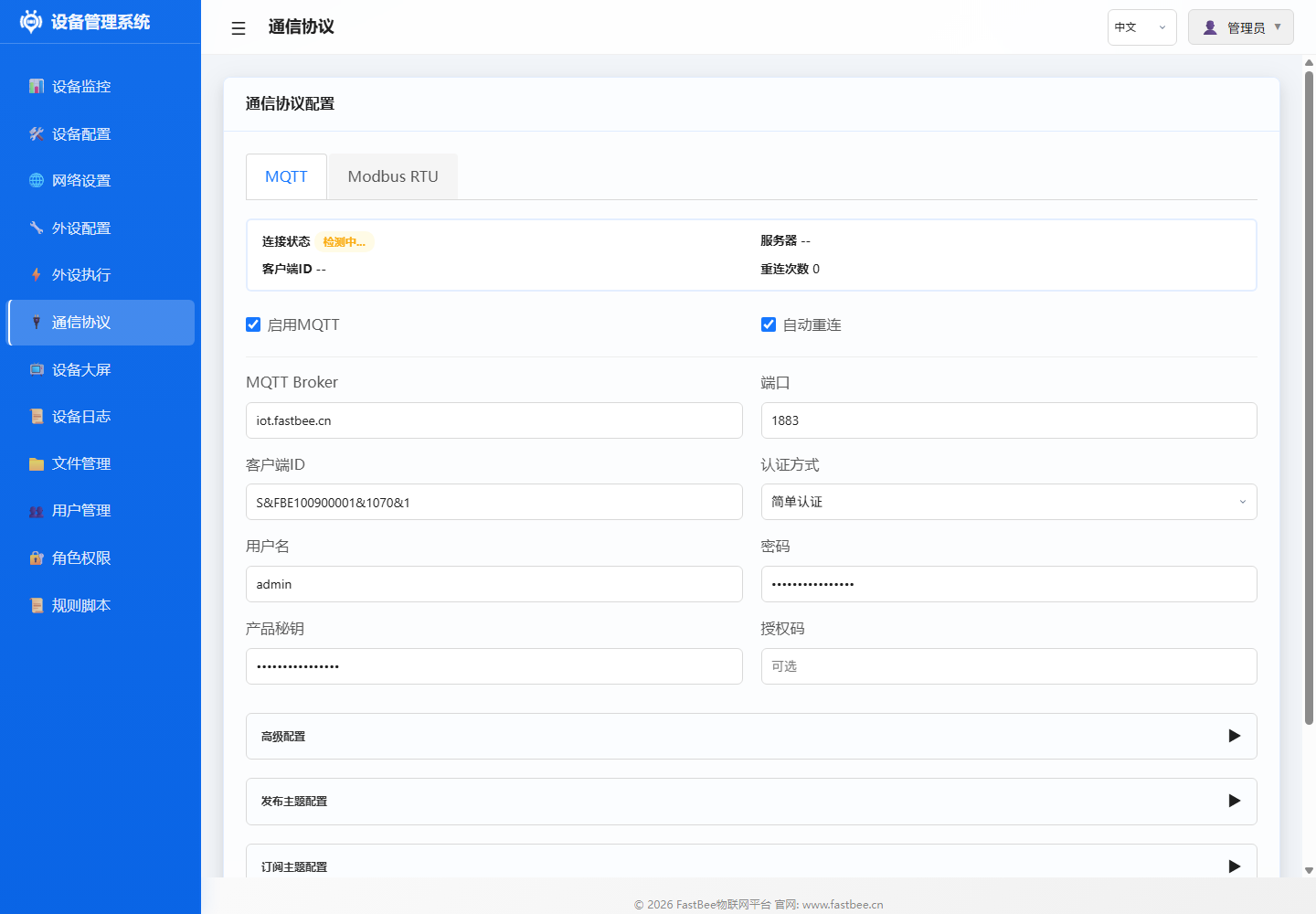
The communication protocol page centrally manages MQTT and Modbus RTU. First confirm network is online, then configure MQTT; when RS485 slaves need to be connected, go to the Modbus RTU page to configure serial port, slaves and register mapping.
| Area | Field | Example Value / Status |
|---|---|---|
| Status Overview | Risk Level | Low |
| Status Overview | Enabled Tasks | 0 |
| Status Overview | Timeout Rate | 0% |
| Status Overview | Total Polls / Success / Fail / Timeout | 0 / 0 / 0 / 0 |
| Basic Config | Enable Modbus RTU | Enabled |
| Basic Config | Peripheral Config Selection | Select configured RS485/UART peripheral |
| Basic Config | Transport Type | Passthrough (raw HEX frames) |
| Basic Config | DE Pin (RS485) | 14 |
| Sub-device Name | Type | Slave Address | Device Info | Enable | Actions |
|---|---|---|---|---|---|
| Temp/Humidity | Collection | 2 | FC04 @0 x2 [2 mappings] | ON | Edit / Map / Delete |
| PM25-10 | Collection | 1 | FC03 @0 x2 [2 mappings] | ON | Edit / Map / Delete |
| Weather Louver | Collection | 4 | FC03 @500 x8 [6 mappings] | ON | Edit / Map / Delete |
Documentation List
| Document | Description |
|---|---|
| MQTT Configuration | MQTT server connection, topic format, authentication, reconnection mechanism |
| Modbus RTU | Serial config, slave scanning, register mapping, polling strategy (Full Usage Guide) |
Protocol Overview
Edition Applicability and Unified Data Format
The protocol layer is uniformly managed by ProtocolManager, with underlying network from WiFi, Ethernet or 4G. Protocol capabilities differ across Lite, Standard and Full editions, but data reporting, status reporting, command dispatch and error responses should follow the same message envelope for long-term platform maintenance.
| Capability | Lite | Standard | Full |
|---|---|---|---|
| MQTT Connection & Property Reporting | Required | Required | Required |
| MQTT Command Dispatch | Recommended | Required | Required |
| Modbus RTU | Disabled by default | Supported | Supported |
| OTA Messages | Disabled by default | Optional | Required |
| Remote Config | Basic config API | Common config API | Full config & file capabilities |
| Error Code Reporting | Basic error codes | Full error codes | Full error codes & diagnostic fields |
MQTT Topic Conventions
Default topics should consist of product, device and message type. Actual projects can adjust the prefix through configuration, but the platform and device must remain consistent.
{prefix}/{deviceId}/property    # Property/collection data reporting
{prefix}/{deviceId}/event       # Event, alarm, error code reporting
{prefix}/{deviceId}/command     # Platform command dispatch
{prefix}/{deviceId}/config      # Remote config dispatch or config result reporting
{prefix}/{deviceId}/ota         # OTA commands and upgrade status, must test in Full
{prefix}/{deviceId}/status      # Online, heartbeat, version and resource status
Unified Message Envelope
All platform interaction messages should include deviceId, timestamp, messageId, type, data. Command messages must include messageId, and the device returns the same messageId after processing, for platform deduplication and tracking.
{
  "deviceId": "fastbee-001",
  "timestamp": 1710000000,
  "messageId": "msg-20260610-0001",
  "type": "property",
  "data": {
    "temperature": 26.5,
    "humidity": 60
  }
}
Command Dispatch Format
{
  "deviceId": "fastbee-001",
  "timestamp": 1710000000,
  "messageId": "cmd-0001",
  "type": "command",
  "data": {
    "command": "gpio.write",
    "params": {
      "peripheralId": "relay_01",
      "value": 1
    }
  }
}
Command responses should uniformly return ok, code, message and optional data:
{
  "deviceId": "fastbee-001",
  "timestamp": 1710000001,
  "messageId": "cmd-0001",
  "type": "commandReply",
  "data": {
    "ok": true,
    "code": 0,
    "message": "OK"
  }
}
Status and Error Code Reporting
Status reporting helps the platform determine if the device is running stably long-term. Should include at minimum: firmware version, edition tier, network type, MQTT status, free memory, PSRAM status, uptime and last error code.
{
  "deviceId": "fastbee-001",
  "timestamp": 1710000002,
  "messageId": "status-0001",
  "type": "status",
  "data": {
    "edition": "full",
    "firmware": "1.0.0",
    "network": "wifi",
    "mqttConnected": true,
    "heapFree": 72480,
    "heapMaxAlloc": 40960,
    "psramTotal": 8388608,
    "uptimeSec": 86400,
    "lastError": {
      "code": 0,
      "name": "OK",
      "message": ""
    }
  }
}
Error codes should prioritize using unified error codes from include/core/ErrorCodes.h. The platform can display numeric code, enum name and field handling recommendations simultaneously.
OTA and Remote Config Format
OTA firmware upgrade is enabled by default only in Full edition as a required capability; Standard can enable OTA based on resource budget; Lite does not depend on OTA by default. Upgrade commands should include version, firmware URL, checksum, package type and upgrade strategy.
{
  "deviceId": "fastbee-001",
  "timestamp": 1710000003,
  "messageId": "ota-0001",
  "type": "ota",
  "data": {
    "targetVersion": "1.1.0",
    "packageType": "firmware",
    "url": "https://example.com/fastbee-esp32s3-F16R8.bin",
    "sha256": "replace-with-release-sha256",
    "force": false
  }
}
Remote config should be dispatched incrementally by module, and the device must validate field legality. Failed config writes should not overwrite old config; configs requiring restart should be clearly marked in the response.
{
  "deviceId": "fastbee-001",
  "timestamp": 1710000004,
  "messageId": "cfg-0001",
  "type": "config",
  "data": {
    "section": "network",
    "version": 2,
    "apply": "restart",
    "patch": {
      "hostname": "fastbee-line-01"
    }
  }
}
Abnormal Message Handling Rules
| Abnormal Scenario | Device Handling | Reporting/Response Recommendation |
|---|---|---|
| JSON Unparseable | Discard message, no action | Return ERR_WEB_PARSE_FAILED or protocol parse error |
| Required Fields Missing | No action | Return ERR_INVALID_PARAM |
| Topic Mismatch | Ignore message | Log DEBUG/WARN |
Duplicate messageId | Idempotent handling | Return last processing result |
| Network Interrupted | Enter reconnection flow | Report status after network recovery |
| Config Write Failed | Preserve old config | Return ERR_CONFIG_SAVE_FAILED |
| OTA Verification Failed | Abort upgrade, keep current firmware | Return ERR_OTA_VERIFY_FAILED |
MQTT
FastBee devices communicate with cloud platforms/private servers via MQTT protocol, supporting:
- TLS/non-TLS connections
- Custom topic prefix
- Last Will and Testament (LWT)
- Auto-reconnection with exponential backoff
Multi-Network Transport Support
MQTT communication supports multiple network transport layers through the unified Arduino Client interface:
| Transport | Underlying Client | Build Requirement |
|---|---|---|
| WiFi | WiFiClient | All builds |
| Ethernet | WiFiClient (ETH compat layer) | esp32s3-F16R8 |
| 4G Cellular | TinyGsmClient | esp32s3-F16R8 |
When switching network modes, MQTT automatically uses the corresponding Client instance without manual configuration.
Modbus RTU
FastBee supports acting as Modbus RTU Master, connecting to multiple slave devices via serial port:
- Supports UART0/1/2 port configuration
- Auto slave scanning and discovery
- Batch register polling
- Read results mapped to peripheral channels
Related Documentation
- Network Configuration — WiFi, Ethernet, 4G network settings
- Modbus Device Peripheral — Modbus peripheral type configuration
- Modbus Usage Guide — Detailed Modbus usage tutorial