
FMQ Cluster Deployment
FMQ Service Deployment
Copy Deployment Files
Copy the fmq folder to /opt, then grant execution permission:
chmod u+x permission.sh
./permission.sh
Update Spring Boot Configuration
Edit opt/fmq/application.yml. Use internal IP addresses for the local node and cluster node list:
localAddress: 1x.x.x.x
static-ip-addresses: 1x.x.x.x, 1x.x.x.xx
Update the Kafka bootstrap-servers setting and enable the message bridge when Kafka forwarding is required:
kafka:
  broker-enabled: true
  bootstrap-servers: 127.0.0.1:9092
  producer:
    acks: -1
    retries: 3
    batch-size: 16384
    buffer-memory: 33554432
    key-serializer: org.apache.kafka.common.serialization.StringSerializer
    value-serializer: org.apache.kafka.common.serialization.StringSerializer
    partitioner:
      class: cn.fastbee.iot.store.kafaka.MqttPartitioner
  message-bridge:
    bridge-topics:
      - "property_post"
    enable: true
Update the WebHook authentication URL:
webhook-url: http://127.0.0.1:18083/webhookPackage The Project
In the fmq-application pom file, keep resource exclusions for runtime configuration:
<resources>
    <resource>
        <directory>src/main/resources</directory>
        <excludes>
            <exclude>application.yml</exclude>
            <exclude>application-dev.yml</exclude>
        </excludes>
    </resource>
</resources>
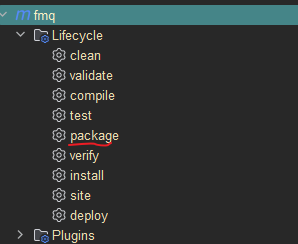
Run package in IDEA, then copy fmq-application.jar to /opt/fmq.
Create A Systemd Service
Register the service:
./fmq-system-register.shStart, check, and stop the service:
systemctl start fmq
systemctl status fmq
systemctl stop fmq
Direct Run Mode
./fmq-start.sh start
./fmq-start.sh stop
Deploy Other Nodes
Before deploying each additional node, update its local IP and the cluster IP list in application.yml:
localAddress: 1x.x.x.x
static-ip-addresses: 1x.x.x.x, 1x.x.x.xx
Cluster Verification
After deployment, open http://ip:18083, log in to the FMQ visual console, and check Home -> Nodes.

If multiple nodes are displayed, the cluster discovery configuration is effective.