
MQTT Configuration
About 2 min
MQTT Configuration
Feature Description
MQTT is the main protocol for FastBee device communication with cloud platforms/private servers. It supports device status reporting, remote command dispatch, last will messages and auto-reconnection.
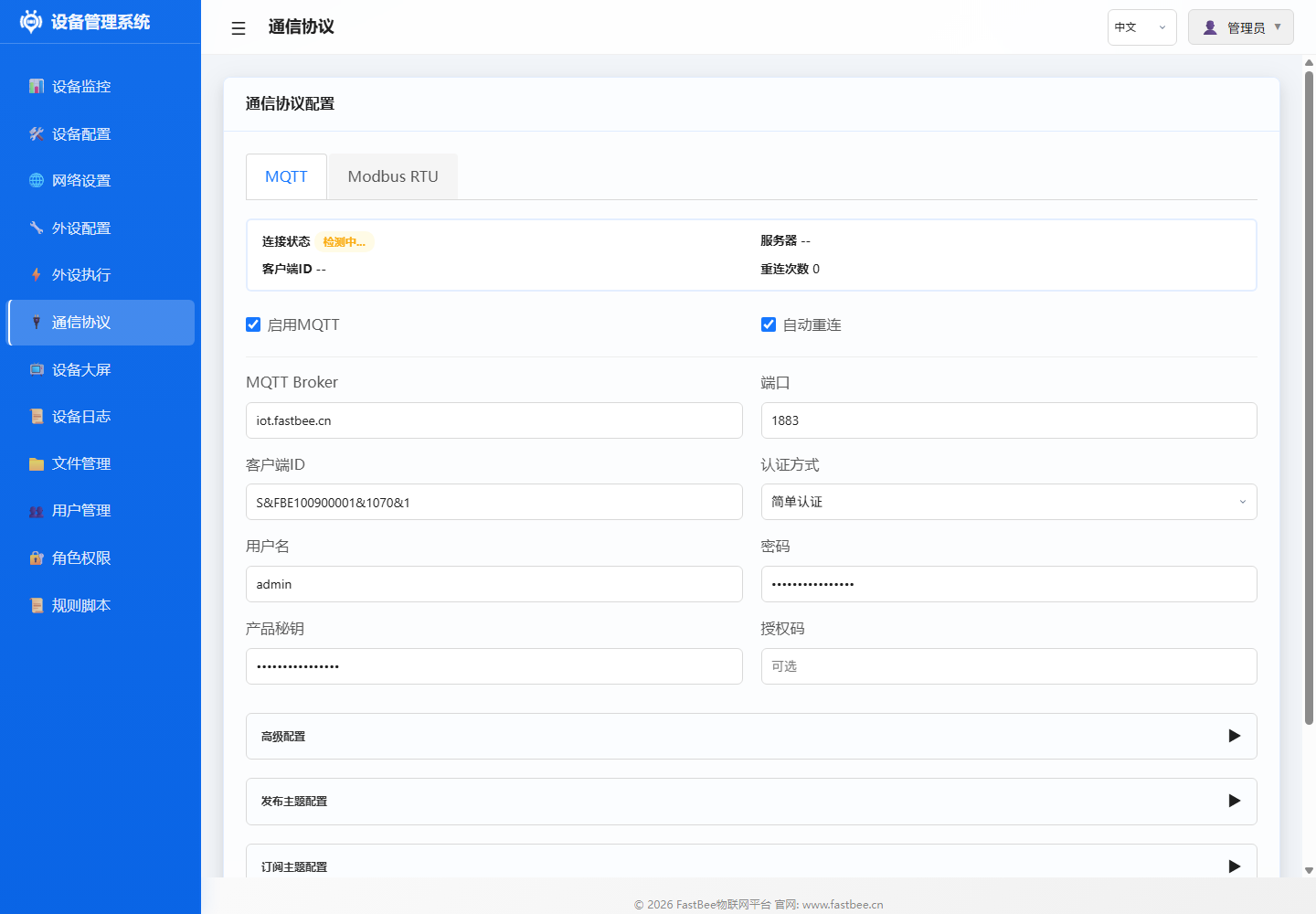
Before saving config, confirm Broker address, port, client ID and topic prefix match the platform side; for public network or production environments, enable authentication and evaluate TLS resource usage.
For connection issues, troubleshoot from left to right: when network is not ready, go back to network page first; when auth fails, verify Broker and credentials; when topics are abnormal, check platform-side topic conventions.
Operation Guide
- Enter Web interface → MQTT Configuration (or Communication Protocol page)
- Fill in server address, port, authentication info
- Configure topic prefix
- Save and test connection
Parameters
| Config Item | Description | Default |
|---|---|---|
| Server Address | MQTT Broker IP/domain | Empty |
| Port | Connection port | 1883 (TCP) / 8883 (TLS) |
| Client ID | Device unique identifier | FastBee- |
| Username | Auth username | Empty |
| Password | Auth password | Empty |
| Topic Prefix | Publish/subscribe topic prefix | fastbee/ |
| Keep Alive | Heartbeat interval (seconds) | 60 |
| QoS | Message quality of service level | 0 |
| TLS | Enable encryption | No |
| Will Topic | LWT topic | {prefix}/status |
| Will Message | LWT message content | offline |
Configuration Examples
Connect to Public MQTT Server
{
  "broker": "broker.emqx.io",
  "port": 1883,
  "clientId": "FastBee-A1B2C3",
  "username": "",
  "password": "",
  "prefix": "fastbee/device01/",
  "keepAlive": 60
}
Connect to Private Server (with Auth)
{
  "broker": "192.168.1.10",
  "port": 1883,
  "clientId": "FastBee-A1B2C3",
  "username": "device01",
  "password": "secret123",
  "prefix": "home/esp32/",
  "keepAlive": 30
}
Topic Format
Publish Topics (Device → Platform)
| Topic | Description | topicType |
|---|---|---|
| {prefix}property/post | Property data upload | 0 |
| {prefix}info/post | Device info upload | 2 |
| {prefix}event/post | Event upload | 4 |
| {prefix}monitor/post | Monitor data upload | 3 |
| {prefix}ntp/post | NTP time upload | 7 |
| {prefix}http/upgrade/reply | HTTP upgrade reply | 5 |
| {prefix}fetch/upgrade/reply | Fetch upgrade reply | 6 |
Subscribe Topics (Platform → Device)
| Topic | Description | topicType |
|---|---|---|
| {prefix}function/get | Function command | 1 |
| {prefix}info/get | Device info query | 2 |
| {prefix}monitor/get | Monitor data query | 3 |
| {prefix}ntp/get | NTP time query | 7 |
| {prefix}http/upgrade/set | HTTP upgrade command | 5 |
| {prefix}fetch/upgrade/set | Fetch upgrade command | 6 |
{prefix}is the configured topic prefix, defaultfastbee/. Each topic can be independently enabled/disabled
Troubleshooting
| Issue | Possible Cause | Solution |
|---|---|---|
| Connection Failed | Server unreachable | Check IP/port, firewall |
| Auth Failed | Wrong username/password | Verify Broker credentials |
| Frequent Disconnects | Keep Alive too short | Increase heartbeat interval (30-120s) |
| Message Loss | QoS=0 | Use QoS=1 for important messages |
| Out of Memory | Too many subscribed topics | Reduce subscriptions or message size |